Field service management platform / Project showcase

Workpilot

From the scheduled job to the work on site.

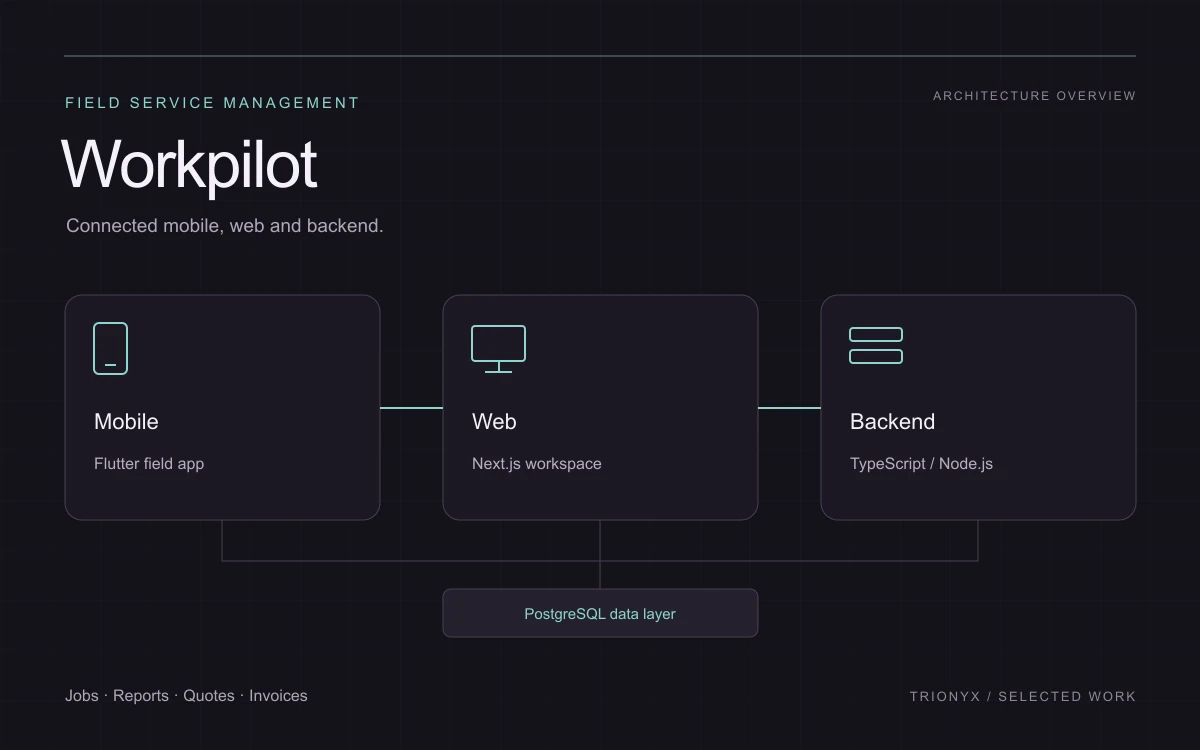
Workpilot connects the office workspace with the field team. The project spans a Flutter mobile application, a Next.js web application and a Node.js backend, with workflows for organizing jobs and the documents around them.

  • Flutter
  • Next.js
  • TypeScript
  • Node.js
  • PostgreSQL
Discuss a similar project ↗
Workpilot: Flutter mobile experience connected to a web workspace and backend
Application architecture illustration. Project overview; no customer records or operating metrics shown.

01 / The product context

A workflow that reaches beyond one screen.

A field service job involves more than its calendar entry. It can start with a customer or site, move through a quotation and scheduling, and produce reports, certificates and an invoice. Workpilot is a useful example of building the connections between these activities rather than treating them as separate applications.

02 / Connected capabilities

What the product brings together.

Job planning and scheduling

The web workspace includes jobs, scheduling and site-related information. The mobile app gives field users a way to work with the task on site. Connecting these surfaces means the data model and workflow need attention alongside the interface design.

Reports and certificates

Site reporting, surveys and certificate workflows support structured records of the work. Photos, files and signatures are relevant device capabilities for these journeys. Different document types require their own fields, review states and presentation.

Quotations and invoicing

Quotation and invoice journeys connect the commercial side of a job to the operational work. The application includes document views and PDF-related workflows. This is relevant to businesses that need the office and field team to work from a consistent job context.

Tools for ongoing service operations

Planned maintenance contracts, stock and tools, price books and a document center broaden the product beyond a simple task list. These modules illustrate why a business platform needs clear boundaries between shared records and specialist workflows.

03 / Engineering considerations

The connections
matter as much
as the screens.

Build around the job lifecycle

The scope follows connected stages: planning, field work, documentation and billing. Mapping that lifecycle helps identify which records need to be shared and where a handoff or review belongs.

A mobile app backed by business APIs

The Flutter application works alongside a Next.js frontend and a TypeScript/Node.js backend with PostgreSQL. Mobile features and dashboard features can evolve around the same business entities rather than duplicating the entire system.

Documents are part of the workflow

Attachments, certificates and printable records have their own storage and presentation requirements. A useful project brief includes who creates each document, who reviews it and where it should be available.

Your project / A practical starting point

Planning a connected business product?

A relevant reference for service businesses planning a field app, an operations dashboard or a connected quotation-to-invoice workflow. Start with one end-to-end job journey and the roles involved, then define the first release around it.