
Building a Flutter App with a Next.js Dashboard: Workpilot
Explore how Workpilot connects a Flutter field app, Next.js workspace and Node.js backend, with practical scope questions for your own full stack product.
A field service product needs to connect the person doing the job with the team planning and reviewing it. Workpilot illustrates this through a Flutter mobile app, a Next.js web workspace and a Node.js backend with PostgreSQL. Its scope includes jobs, scheduling, site reports, quotations and invoicing workflows.
This article explains that connected architecture and the planning questions it raises for a business commissioning similar software. It draws on the Workpilot project overview. The diagrams are architecture illustrations, and the discussion describes engineering scope rather than measured customer outcomes.
Start with the job lifecycle, not a list of screens
A service job can begin with a customer or site, move through a quotation and scheduling, and end with reports, certificates and an invoice. Each stage has different users and different information requirements. Workpilot brings these activities into a connected product instead of treating the calendar, field app and commercial documents as unrelated tools.
For a comparable project, map one representative job before deciding how many screens to build. Who creates it? What must the field user know? Who checks the report? Which information is needed before billing can begin? The answers expose handoffs and missing records that a screen list can overlook.
For example, a proposed workflow might be: the office assigns a job, the field user completes a site report, a reviewer checks the record, and the office prepares the commercial handoff. The exact approval rules and statuses should be defined for your business; they are not automatically the same as another company's process.
What belongs in the Flutter mobile app?
The mobile app should support work performed away from the office. In Workpilot, the Flutter experience sits alongside jobs and site-related reporting. Photos, files and signatures are relevant capabilities in those journeys. A mobile brief therefore needs to describe the task, the information captured and the device behaviour, as well as the visual design.
Flutter can share application code across Android and iOS, but device permissions, operating-system behaviour and platform-specific integrations still need testing. A feature that uses the camera is more than a button: the product must also handle permission refusal, an interrupted action and an unsuccessful upload.
Connectivity deserves its own decision. An app used on site is not automatically an offline app. If your users need to capture information without a signal, explicitly scope local storage, upload retries, sync conflicts and recovery. This article does not claim that Workpilot has a particular offline implementation.
Our Flutter app development service covers the mobile interface, API integration and agreed release requirements. The Flutter cost planning guide explains how features, backend work and device requirements affect the scope.
What does full stack development include in a connected product?
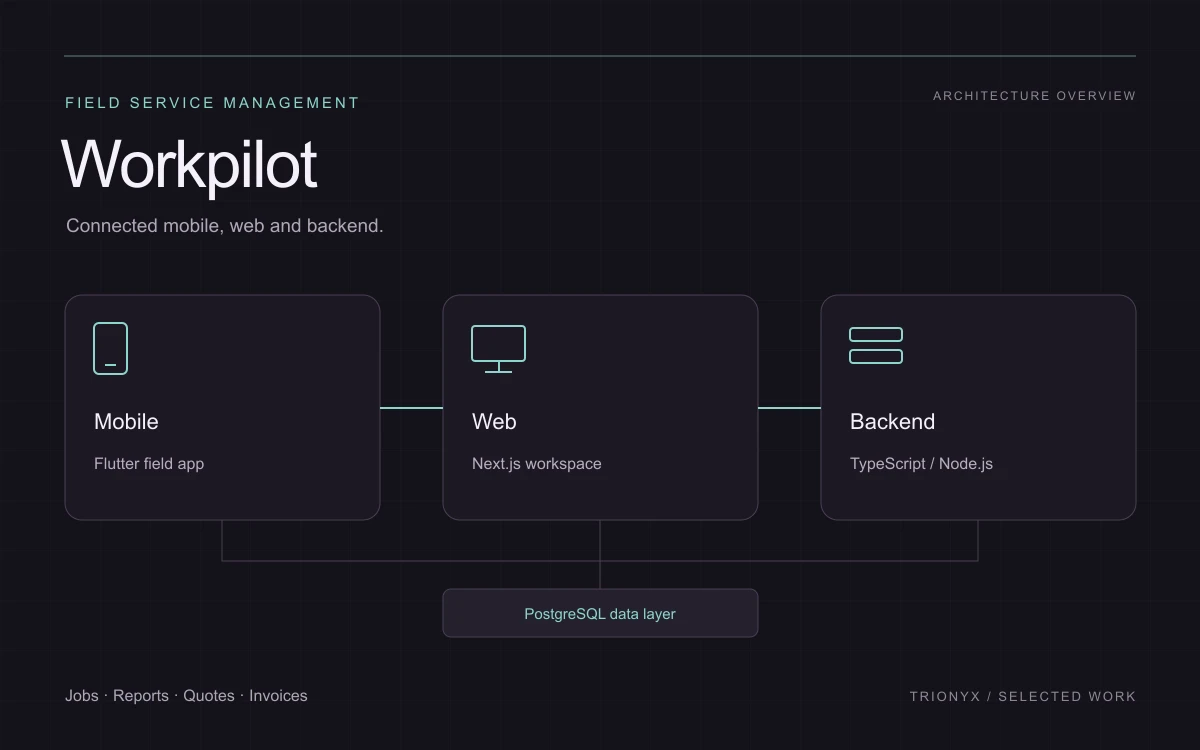
Workpilot combines a Next.js web application with a TypeScript/Node.js backend and PostgreSQL. The Flutter app and web workspace provide different experiences around shared business entities. This is the central full stack concern: the interfaces, business rules and data need to work together, rather than merely exist in the same project.
- Flutter mobile app
- Supports the field user's tasks and device interactions.
- Next.js web workspace
- Provides the office experience for jobs, scheduling and related operational information.
- Node.js backend
- Connects applications with business APIs. A comparable scope must specify validation, permissions and allowed updates.
- PostgreSQL data layer
- Stores the related product records. The project needs a clear model for how jobs, sites and documents relate.
A shared backend does not mean every user can access every record. Define which roles can view, assign, edit, approve or reopen work. The backend must enforce those decisions; hiding a control in an interface is not sufficient access control.
For an existing business, also identify the system responsible for each record. If customer details already live in a CRM, decide whether the new product reads them, copies them or becomes their owner. Review the actual integration before committing to a synchronisation promise.
Explore our full stack development service for connected web, API and database delivery. The full stack project scope checklist helps organise the interfaces, integrations, testing and handover into one brief.
Treat reports, certificates and invoices as workflows
Workpilot includes site reporting, surveys, certificate workflows, quotations, invoicing and PDF-related document journeys. These are useful examples of why a business platform needs more than a generic file-upload feature. A report and an invoice may refer to the same job but need different fields, review steps and presentation.
For each document type, ask:
- Who creates it, and which fields are required?
- Who can review or change it?
- Which job, site or customer record does it belong to?
- Does it need a printable or downloadable version?
- What should happen when information is incomplete or an attachment fails?
Workpilot's broader scope also includes planned maintenance contracts, stock and tools, price books and a document centre. Their presence is a reminder to prioritise. A new project does not need to reproduce every module before its first useful release.
How should you define a useful first release?
Choose one complete workflow and a manageable group of roles. A pilot that connects planning, field capture and office review can reveal more than a large collection of disconnected screens. Specify what each user must be able to finish and what the system should do when a step fails.
A practical acceptance checklist for a similar product might include:
- The office can create and assign a representative job.
- The intended field user can access the correct job information.
- The agreed report fields and attachments can reach the office workspace.
- Users without permission cannot access or change restricted records.
- Failed requests and missing information have clear recovery paths.
- The release includes agreed deployment, account ownership and handover documentation.
These are suggested planning criteria, not a claim about a completed Workpilot acceptance test. Your team should agree its own test cases and devices before implementation. Cost and delivery effort will depend on the roles, document types, integrations, migration and connectivity requirements.
Should you build custom software or use an existing tool?
Start by checking whether an available field service product already supports your essential workflow. Custom development becomes relevant when your job rules, document requirements or integration needs justify owning a tailored system. Sometimes connecting an existing product is the appropriate first step.
Our custom vs ready-made field service software guide provides a decision checklist. If you need a tailored mobile and office workflow, explore our field service software development service.
What should you bring to a first project discussion?
Bring a short description of your users and one job journey. Include the tools you already use, the most important mobile tasks and the records the office needs. Anonymised example forms can make the discussion more concrete; credentials and confidential customer records are not needed.
- Goal: which process should the product connect?
- Users: who works in the field, in the office and in review?
- Existing systems: which tools or APIs must be assessed?
- First release: what is essential, and what can follow later?
- Constraints: target devices, connectivity needs, preferred timing and budget range.
Trionyx Software Solutions is based in Ahmedabad, India. Workpilot is a relevant reference for our Flutter and full stack development work: a mobile app, an office workspace and backend services built around connected operational tasks.
Planning a similar product? Discuss your Flutter app and dashboard, or share your full stack project brief. We will review your goal and discuss the scope and next step.
Technical references
For framework and platform details, see the official Flutter platform integration documentation, Next.js documentation, Node.js introduction and PostgreSQL tutorial. Workpilot-specific statements in this article are drawn from our project overview, rather than inferred from those frameworks' capabilities.